Why Monday.com Is a Database
And why treating it like one changes everything
Most teams use Monday.com as a task manager or a prettier spreadsheet.
That works—until it doesn't.
At a certain point, boards become bloated, automations feel fragile, reporting breaks, and everyone becomes afraid to change anything "because it might break something."
That moment usually signals a missed core truth:
Monday.com is not just a project management tool.
It is a database with a user interface.
Once you internalize this, your entire approach to boards, automations, and scaling changes.
What "Database" Actually Means
A database is simply:
- Structured data
- Clear ownership of records
- Explicit relationships
- Rules that protect consistency over time
In traditional software, this looks like tables, rows, fields, and foreign keys.
In Monday.com, those same concepts already exist—you just may not be thinking about them that way.
The Monday.com → Database Mental Model
| Database Concept | Monday.com Equivalent |
|---|---|
| Table | Board |
| Row | Item |
| Column | Column |
| Primary Key | Item ID |
| Foreign Key | Connect Boards column |
| Join / View | Mirror column |
| Constraints | Column settings + automations |
This is not a metaphor.
This is how Monday.com actually behaves.
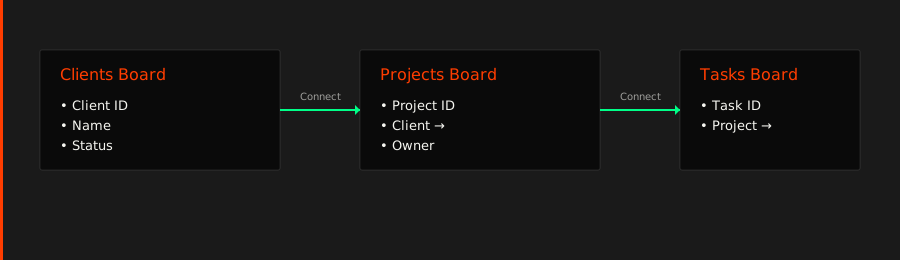
Diagram: Monday.com as a Relational System

Boards Are Tables (Not Teams)
A critical architectural mistake is naming boards after departments:
- "Sales Board"
- "Marketing Board"
- "Ops Board"
That's like naming database tables after job titles.
Instead, boards should represent entities:
- Clients
- Deals
- Projects
- Tickets
- Assets
Ownership belongs in columns, not in board purpose.
Connect Boards Are Foreign Keys
A Connect Boards column is not a shortcut.
It is a relationship.
Use it to answer:
- Which project belongs to which client?
- Which tasks roll up into which project?
- Which tickets are associated with which account?
This is how relational systems scale.
Mirror Columns Are Read-Only Views
Mirror columns behave like:
- Database joins
- Computed fields
They are excellent for:
- Visibility
- Dashboards
- Context
They are not places to edit shared data.
If you feel the urge to "edit through a mirror," your architecture is under strain.
Why This Perspective Changes Everything
Once you treat Monday.com as a database:
- Architecture becomes intentional
- Scaling stops being scary
- Automations become guardrails instead of duct tape
- Reporting becomes reliable
You stop fighting the platform—and start using it the way it's designed to work.
Final Thought
Monday.com feels flexible because it is flexible.
But flexibility without structure is chaos.
Treat Monday.com as:
- A database first
- A workflow engine second
- A UI last
Do that, and your system will scale calmly—long after most teams hit their breaking point.