Building a CRM from Scratch in Monday.com
A Scalable Architecture That Won't Break at 10,000 Items
Before You Start (Important Context)
In a previous article, we explained that:
Monday.com is a database with a user interface — but boards are operational views, not infinite tables.
This tutorial assumes you understand that distinction.
We are not building:
- One giant CRM board
- A forever-growing deal list
- A fragile automation maze
We are building:
- A scalable CRM architecture
- Clear lifecycle movement
- Clean reporting
- Boards that stay fast over time
What You'll Build in This Tutorial
By the end, you will have:
- A multi-board CRM architecture
- A clean Lead → Deal lifecycle
- Reference data separated from activity
- Built-in scalability past 10,000 records
- A foundation suitable for dashboards and automation
CRM Architecture Overview
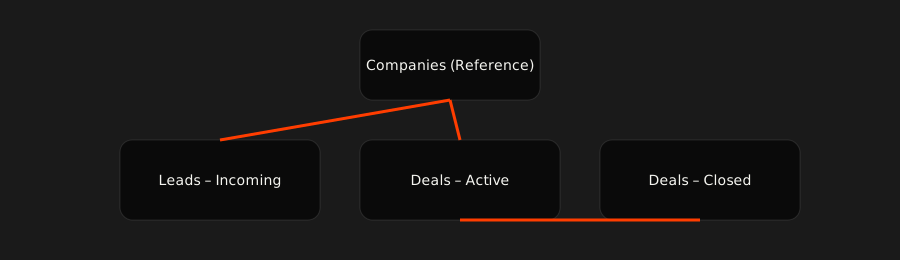
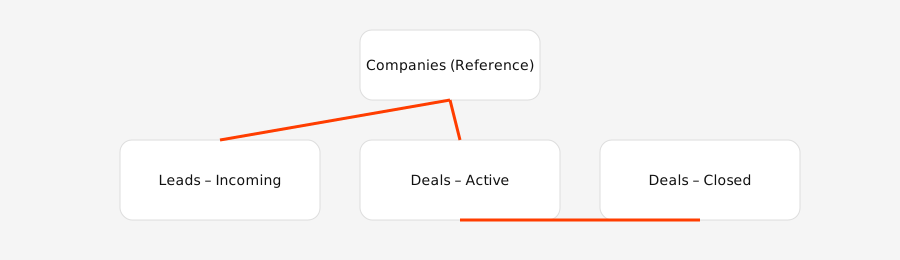
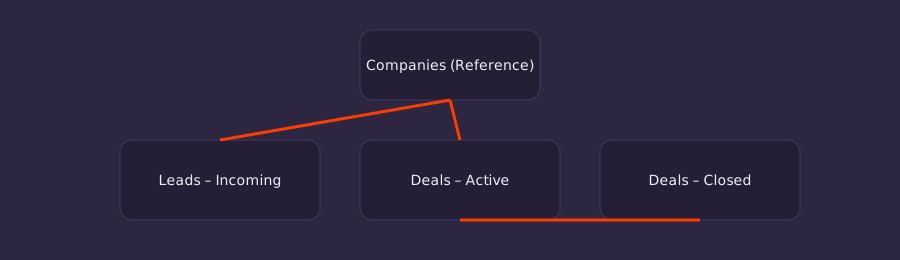
At a high level, the CRM consists of:
Reference Board
- Companies (Accounts)
Operational Boards
- Leads – Incoming
- Deals – Active
Historical Board
- Deals – Closed (Archive)
Step 1: Create the Companies (Accounts) Reference Board
Board name: Companies
Purpose: A single source of truth for organizations you sell to.
Required Columns
| Column | Type |
|---|---|
| Company Name | Item Name |
| Industry | Status / Dropdown |
| Account Owner | People |
| Region / Market | Status |
| Account Tier | Status |
Rules
- One item = one company
- No activities, notes, or deal stages here
- This board grows slowly and stays stable
Step 2: Create the Leads – Incoming Board
Board name: Leads – Incoming
Purpose: Fast intake with minimal friction.
Required Columns
| Column | Type |
|---|---|
| Lead Name | Item Name |
| Company | Connect Boards → Companies |
| Lead Source | Status |
| Lead Owner | People |
| Qualification Status | Status |
Best Practices
- Keep columns minimal
- Allow duplicates
- Optimize for speed, not perfection
Step 3: Create the Deals – Active Board
Board name: Deals – Active
Purpose: Where real sales work happens.
Required Columns
| Column | Type |
|---|---|
| Deal Name | Item Name |
| Company | Connect Boards → Companies |
| Deal Owner | People |
| Stage | Status |
| Deal Value | Numbers |
| Expected Close Date | Date |
This board should stay lean and focused.
Anything that closes leaves.
Step 4: Create the Deals – Closed (Archive) Board
Board name: Deals – Closed
Purpose: Historical record without operational cost.
Rules
- No automations
- Limited editing permissions
- Used for reporting only
Step 5: Automate the Flow
Lead → Deal Conversion
Automation example:
When Qualification Status changes to Qualified:
- Create item in Deals – Active
- Link Company automatically
- Assign Deal Owner
- Move or archive the lead
Deal Closure
Automation example:
When Stage changes to Closed Won or Closed Lost:
- Move item to Deals – Closed
Reporting & Dashboards
Create dashboards that:
- Pull from multiple boards
- Aggregate pipeline value
- Track win rates
- Show activity by owner
Dashboards are where the database view lives — not inside a single board.
Final Takeaway
This CRM works because:
- Monday.com acts as the database
- Boards act as operational workflows
- Data moves instead of piling up
- Scale is designed in from day one
A scalable CRM is not one board.
It's a system of intentional boards.